Student Needs Assessment

This post may contain affiliate links, which means I’ll receive a commission if you purchase through my links, at no extra cost to you.
School Counseling Student Needs Assessment
I’ll be honest when I first became a school counselor I didn’t do a student needs assessment. I felt super lost those first few years and by the time things settled down it seemed too late to send out a needs assessment. The reality is it only takes 10 minutes to set up a student needs assessment in google forms and 5 minutes to determine how students will access your needs assessment. Set aside 15 minutes today to gather data that will help mold your counseling program!
Google Forms
We use google forms to create our student needs assessment because it’s super easy!! We also like how the data is displayed; providing us with specific categories to work on for each gender and grade level. Creating the assessment in google forms is the easy part, the hard part is determining the most efficient way for students to access your needs assessment.

How will Students Access your Needs Assessment?
Spend some time brainstorming the most efficient method for disseminating your needs assessment. You might be faced with some limitations but get creative and I’m certain you can find a solution. Here are some methods you can use to distribute your needs assessment:
- Create a bit.ly and ask teachers to share the link with students in advisory/homeroom.
- Add the link to your website. Then ask your tech department to add your counseling website to your schools “bookmarks” or “desktop” or wherever students can easily access. Ask a department (science, PE, social studies, etc) to use the needs assessment link as their class warm-up.
- Set up 5-10 computers at lunch and give students a piece of candy once they’ve completed the google form. I recommend having a list of student names so you can check them off as they come up to your station. Otherwise you’ll have kiddos trying to come up multiple times for that candy!
- Check out a set of computers or reserve a computer lab. Create a “meet the counselor” lesson and ask students to complete the link at the end of your lesson. I choose this method this year and it turned out really well.
Be creative in your methods! It may not be ideal or as easy for you to complete the task as other counselors but if you’re creative and determined you can find a way to complete your student needs assessment.
Gather Basic Data
We start by gathering basic data: name, ID, gender, and grade level. All of this data helps us determine how we’ll deliver our guidance lessons. We’ve found that each grade level and gender tend to answer the needs assessment differently. The needs assessment tells us we need to give one lesson to the 7th grade girls, a different lesson to the 7th grade boys, and a completely different lesson to the entire 6th grade.
Determining Student Needs
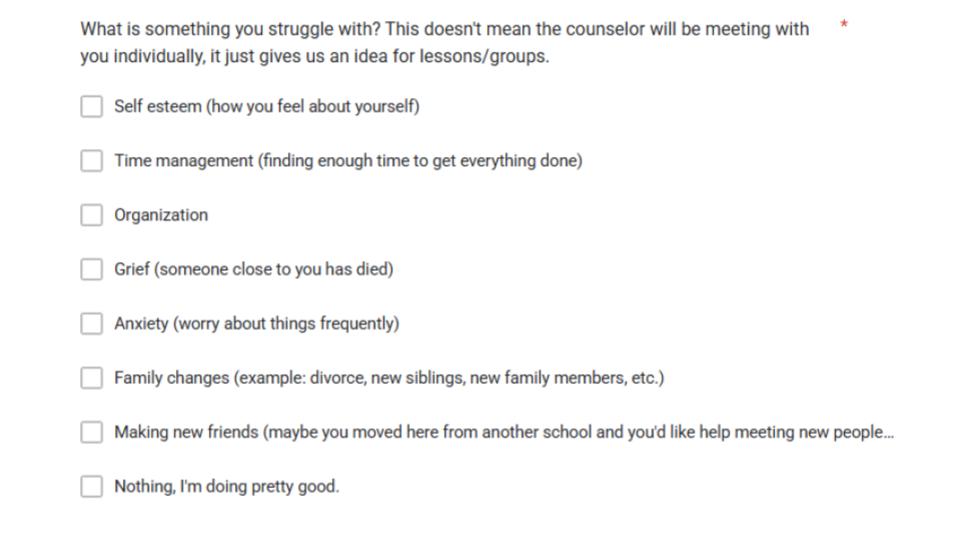
We ask students “What is something you struggle with? This doesn’t mean the counselor will be meeting with you individually, it just gives us an idea for lessons/groups for your grade.” I tell students, if everyone in your grade is struggling with organization then I’ll make a lesson for the whole grade. The information you put in here is just to help me plan. If you write something specific and you want me to call you down to talk about it, then I need you to put that in the last question box. Type “I’m struggling with ____ and I want you to call me down sometime.”
We provide them with a list of options to choose from (all worded in terms they’ll understand):
- self esteem (how you feel about yourself)
- time management (finding enough time to get everything done)
- organization
- grief (someone close to you has died or is no longer in your life)
- anxiety (worrying about things frequently)
- family changes (example: divorce, new siblings, new family members, etc.)
- making new friends (maybe you moved here from another school and you’d like help meeting new people)
- how to deal with stress
- Nothing, I’m doing pretty good
There are a lot of topics not included in our list because some of those topics are things we already consider mandatory guidance lessons (example: bullying, drugs/vaping, etc). Also keep in mind, you should have a guidance lesson/group planned for every item listed in your needs assessment. What’s the purpose in identifying students who need support with “anxiety” if you don’t plan on helping them. Reflect back on what’s your purpose for the needs assessment and tailor your questions/answers to meet your needs.
Setting Up Minute Meetings
The very last question I ask students is “What’s one thing you’d like your counselor to know about you? (good, funny, exciting, bad, sad, anything you want me to know)“. This is the first year I’ve asked this question so I wasn’t really sure how it would work out. Some students told me random facts “I can name all 50 states” and other students told me about more serious issues such as “my parents are getting divorced, and it’s been really hard on me.” I’m glad I added this question, it’s made my Minute Meetings much more personable.
This is the first year I’ve done Minute Meetings, where I meet with every new/incoming student for 1 minute. The purpose is to set the groundwork for the rest of the school year and create a positive relationship with the students. My hope is that as the year progresses, they’ll feel more comfortable coming to talk to me if needed. It’s the first year I’ve done Minute Meetings, so we’ll see how it all works out.
How To Use the Data Collected
I typically start by looking at the answers to the last question, “What’s one thing you’d like your counselor to know about you?” This is where I find the most helpful information and I also find the students who will need the greatest support. I highlight anything that looks out of the ordinary and then I start making my groups based on the highlights. I look for trends in issue/topic, gender, and grade level. I can typically have 2-3 groups created by simply reviewing my Needs Assessment.
These Student Needs Assessments are a MUST for me!! I get so much helpful information and it helps me jumpstart the school year!!